Mailer box dieline template
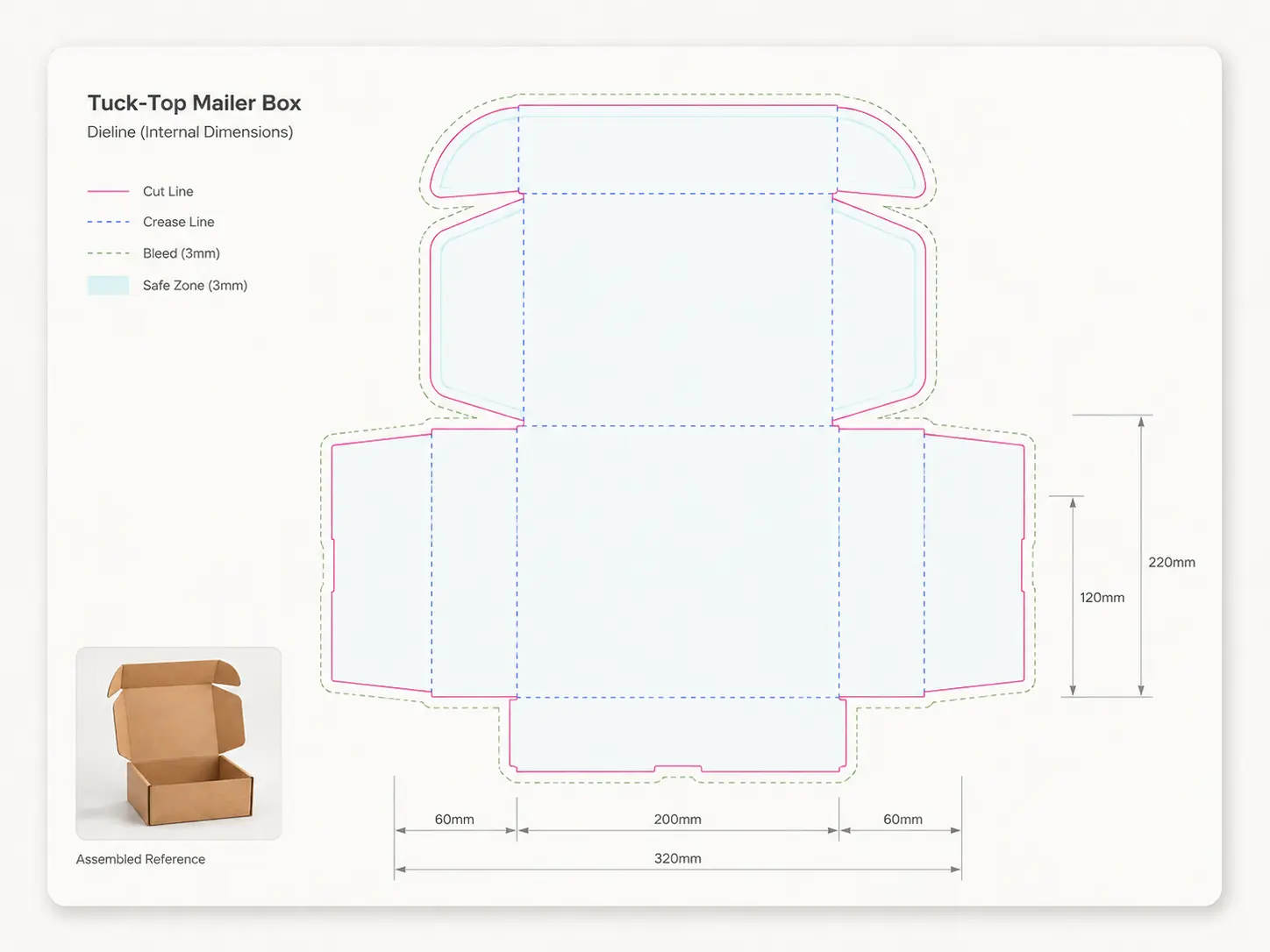
A mailer box (also called a roll-end tuck-front box or e-commerce box) is the standard unboxing box for subscription and DTC brands. It folds from one flat sheet with no glue, which is why the dieline looks complicated and why getting it right matters. Design straight onto it in 3D.
Standard sizes
Common starting points from Packaroo’s presets. You can also set your own dimensions in the editor. These are working sizes; confirm the exact spec with your supplier.
| Size | Board | Inside length | Inside width | Inside height |
|---|---|---|---|---|
| Small | E flute | 110 mm | 164 mm | 62 mm |
| Medium | B flute | 150 mm | 220 mm | 85 mm |
| Large | C flute | 200 mm | 300 mm | 110 mm |
| Extra Large | C flute | 250 mm | 370 mm | 140 mm |
Outside dimensions run a few millimetres larger depending on board thickness. Most printers ask for 3 mm (1/8 in) bleed and a 3 to 5 mm safe margin. Always check your printer’s own spec before you send files.
How to read this dieline
Every Packaroo dieline uses the same four line types.
The outside edge of the pack. Anything past this line is trimmed off.
Where the board or film folds. Keep text and logos about 3 mm away so they do not land on a crease.
Extend background colours and images to this line so no white edge shows if the cut shifts.
Keep text, barcodes and logos inside this line, usually 3 to 5 mm inside the cut.
Before you design
The panels people print wrong
On a mailer box the front tuck flap and the two side dust flaps are the parts most often printed the wrong way round, because they sit upside down relative to the lid in the flat layout. Packaroo’s 3D view shows which way each panel faces before you export.
Inside or outside dimensions?
Always size a mailer from the inside: the space your product needs. The board adds thickness on every side, so the outside of the box is slightly larger.
Which board?
Most mailers are made from E-flute or B-flute corrugated. Fold allowances change with board thickness, which is one reason to send your supplier a spec pack rather than a flat PDF: they can see exactly which dieline and dimensions you used and adjust for their board.
Design it in 3D instead
In Packaroo you drop your artwork onto this dieline, see it as a 3D pack you can spin, check bleed and safe area, then export a spec pack your supplier can quote from. Start on the free plan, then export a spec pack for A$15, or subscribe if you export often.
Try it freeFrequently asked questions
What is a mailer box dieline?
A dieline is the flat 2D layout of a box showing where it is cut, folded and printed. For a mailer box it includes the base, lid, front tuck flap, side walls and dust flaps laid out as one sheet.
Can I change the dimensions?
Yes. Open the mailer box in Packaroo and type your own length, width and height; the dieline and 3D preview update as you go.
Will my printer accept the file?
The dieline uses standard cut, fold and bleed conventions. For production, export a Packaroo spec pack, which adds the specification sheet and prepress report suppliers ask for.
Which board should I choose?
E-flute for small and medium mailers that need a premium print finish; B-flute for larger or heavier contents. Your supplier can advise once they have your spec pack.
Can I design on this template?
Yes. Open it in Packaroo, drop in your artwork and see it in 3D on the free plan. A spec pack export for your supplier is A$15.
Design your mailer box in 3D.
Start on this dieline with your own artwork on the free plan, and export a spec pack when you are ready.